
How to Use OpenArt AI Lip Sync: Make AI Characters Talk in 2026

AI lip sync video creation has become a must-have skill for marketers in 2026. Brands want content that moves, speaks and connects. Static images no longer cut it on platforms like TikTok, Instagram Reels and YouTube Shorts.
OpenArt AI bundles four powerful AI lip sync models into one platform. You can make any AI character talk, sing or present a product without hiring actors or renting a studio. It even works with custom audio file uploads for full creative control.
If you want a step-by-step OpenArt AI lip sync tutorial that covers everything from setup to final export, you are in the right place. Let us break it down.
What Is OpenArt AI Lip Sync?
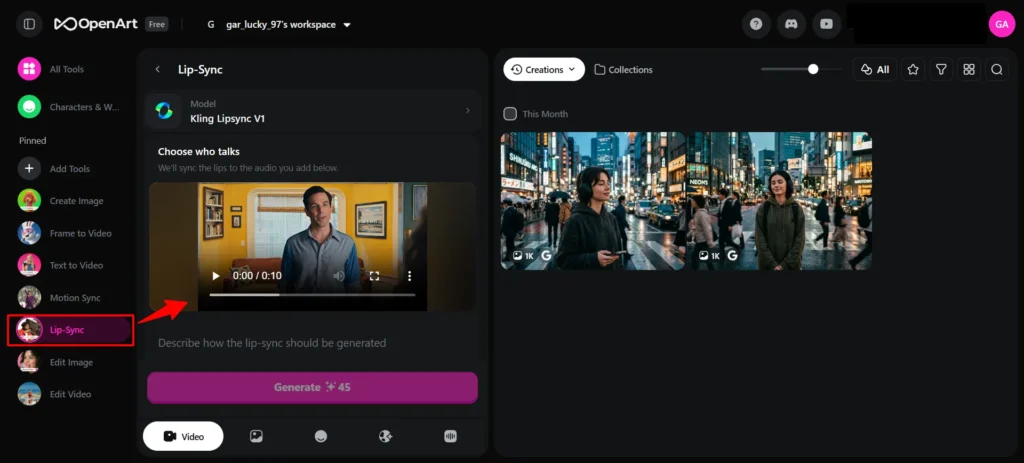
OpenArt lip sync is an AI-powered feature that animates still images or video clips by syncing realistic mouth and facial movements to audio. It supports everything from product demos to storytelling reels to educational content.
Here is what makes it stand out in 2026:
For marketers, the value is clear. You can create talking AI character videos at scale without hiring actors, renting studios, or spending days on post-production. A single image and a short audio clip are all it takes.
🌟 Create AI Videos Faster — Save 15% on OpenArt Lip Sync
Save 15% with code ALL15 Upload your own audio or use built-in voice tools, pick a model, and create realistic or stylised videos effortlessly.
Use Code 🎁
ALL15
Four AI Lip Sync Models on OpenArt: Which One Should You Pick?
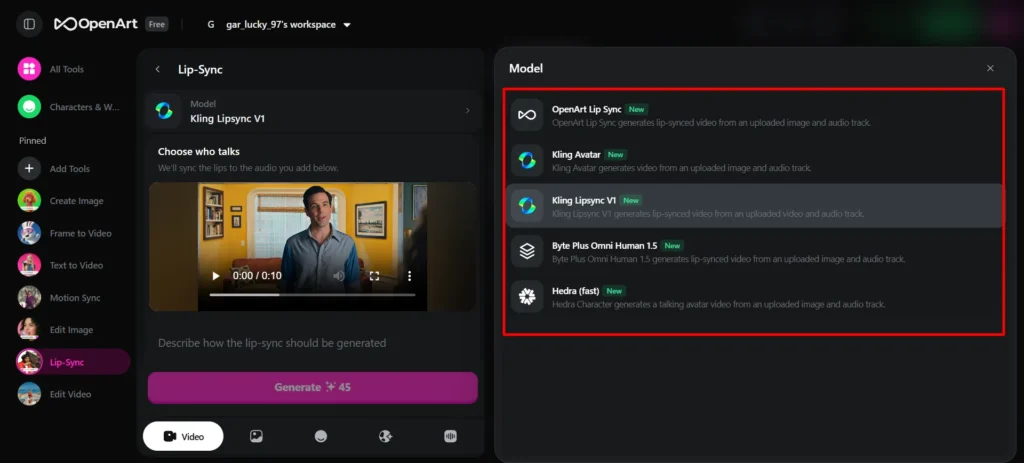
OpenArt gives you four distinct engines. Each one excels at a different type of content. Here is a quick breakdown:
| Model | Best For | Key Strength | Image Type |
|---|---|---|---|
| OmniHuman | Realistic spokesperson videos | Hyper-realistic facial movements | Photorealistic portraits |
| InfiniteTalk | Long-form educational content | Natural conversational rhythm | Any portrait style |
| Hedra | Cartoon and stylised characters | Handles non-photorealistic art | Illustrated, anime, artistic |
| Kling | Music videos and motion-rich content | Full body motion and gestures | Half-body and upper-body shots |
1. OmniHuman: Best for Realistic AI Spokesperson Videos
OmniHuman is arguably one of most advanced AI lip sync models available today. It generates hyper-realistic facial movements that go far beyond basic mouth opening and closing.
What makes it stand out? It captures micro-expressions, subtle jaw movements and natural head tilts while speaking. Results feel very close to actual filmed footage. If you need a realistic AI talking portrait for product demos or brand content, OmniHuman is your go-to model.
It uses a three-stage training approach. First, it learns general motion from text. Then it refines lip sync from audio. Finally, it masters full-body motion from pose data. That layered method produces strikingly lifelike results.
2. InfiniteTalk: Built for Long Conversations and Explainers
InfiniteTalk (also called OpenArt LipSync) is optimised for extended dialogue. It handles pacing, pauses and natural speech cadence better than most alternatives.
Pick InfiniteTalk when you are creating educational video content with AI, podcast animations or audiobook visualisations. It stays consistent over longer clips, which makes it ideal for content that runs beyond a few seconds.
3. Hedra: Perfect for Cartoon and Stylised Characters
Not every brand uses photorealistic imagery. If you work with illustrated mascots, anime characters or digital art, Hedra is your best option.
Hedra retains an original artistic style while adding convincing mouth movements. It handles cartoon characters and stylised portraits with more consistency than models built for realism.
Social media entertainment content and AI-generated animated videos perform exceptionally well with Hedra. Meme creators and brands with playful identities love it.
4. Kling: Ideal for AI Music Videos and Body Motion
Kling stands apart because of its superior body motion generation. While every model animates a mouth, Kling adds natural head nods, shoulder shifts and rhythmic body movements.
For marketers producing AI music video content, Kling is a clear winner. It syncs body language to musical beats, giving your character a more alive and energetic feel.
It also works as a video-to-lip-sync model. You can feed it an existing video clip and overlay new audio with matched lip movements.
How to Create AI Lip Sync Videos on OpenArt?
Ready to create your first AI lip sync video? Follow these steps.
Prepare Your Source Image
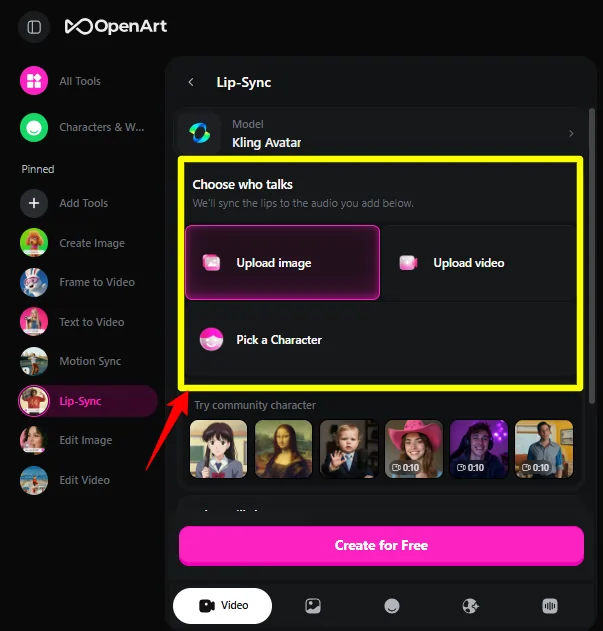
Your starting image matters a lot. Use a high-resolution portrait where facial features are clearly visible. Front-facing or slightly angled portraits work best.
You can use:
Avoid extreme side profiles, covered mouths or heavily blurred images. Clean, well-lit portraits produce far better results.
Upload Your Audio File
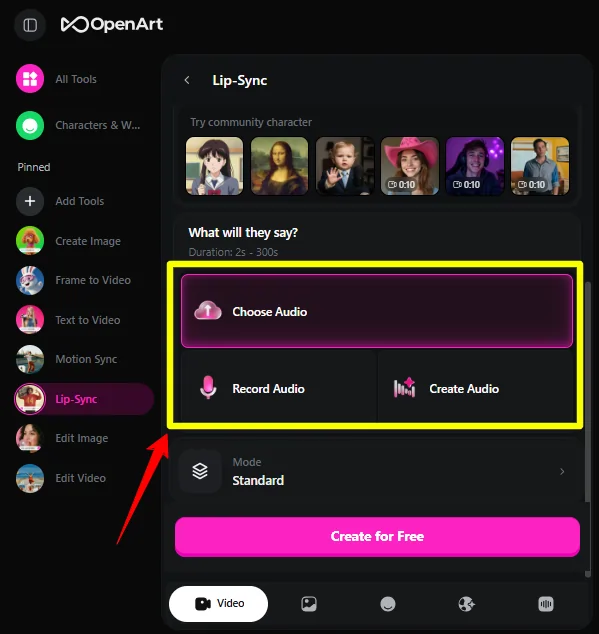
One of OpenArt's strongest features is custom audio file upload. You are not stuck with built-in text-to-speech voices.
Upload your own voiceover recording, a music track, dialogue clips or singing performances. Supported formats include MP3 and WAV. Clean audio with minimal background noise gives best results.
OpenArt also offers integrated text-to-speech powered by ElevenLabs. Just type your script, pick a voice and generate audio directly on the platform.
Select Your Lip Sync Model
Choose a model based on your content goal:
Not sure which to pick? Start with OmniHuman for realistic images and Hedra for illustrated ones.
Configure Settings and Generate
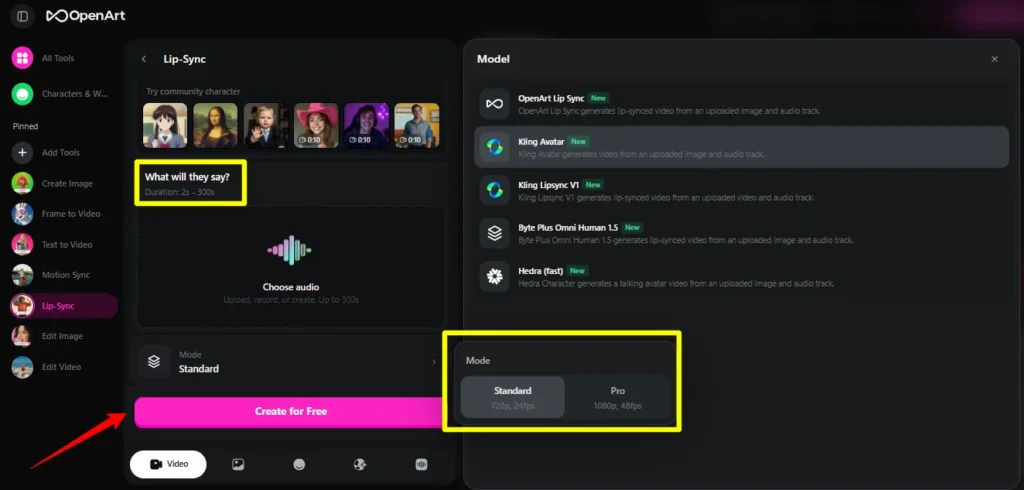
Adjust available settings like video length and expression intensity. Click generate and wait a few minutes. Most clips render quickly depending on duration and model selected.
Download Your Finished Video
Preview your video directly on OpenArt. If something feels off, tweak settings and regenerate. Download finished videos in MP4 format ready for publishing.
How Marketers Are Using AI Lip Sync Right Now
AI lip sync for marketing is no longer experimental. Brands and creators use it in real campaigns every day.
In 2026, real-time generative sync is also gaining momentum. Advanced models now synthesise lip movements along with micro-expression adaptation, where cheek and jaw muscles react to audio intensity.
What Makes OpenArt Stand Out From Other Lip Sync Platforms? 🏆
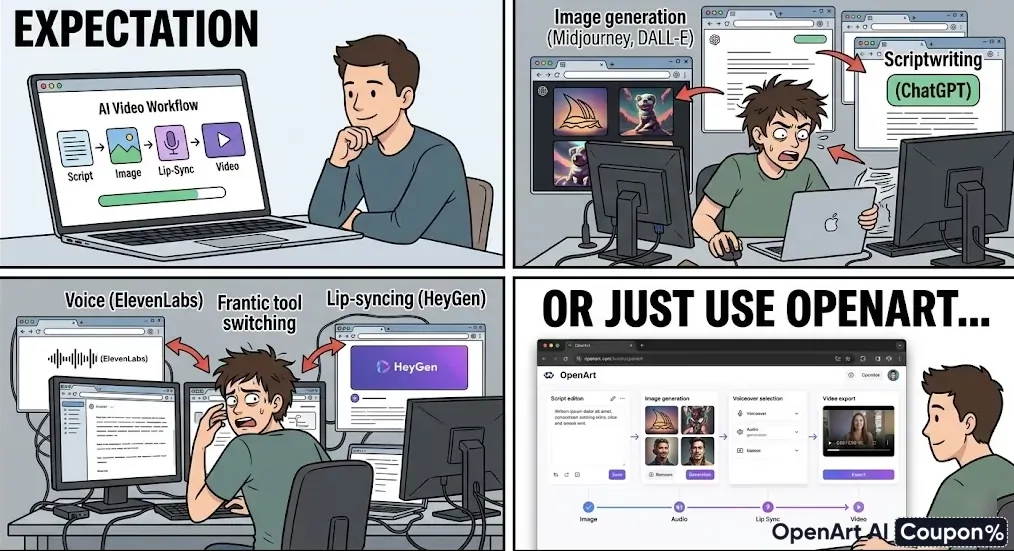
Several platforms offer AI lip sync video tools in 2026. ElevenLabs, HeyGen and Magic Hour all compete in a similar space. So why choose OpenArt?
For marketers running campaigns at scale, having everything under one roof saves time and budget.
🚀 Scale Your Video Marketing for 15% Less
Grab 15% OFF with ALL15 No more tool-hopping. Generate images, voices, and lip sync videos in one place with OpenArt’s powerful ecosystem—built for creators and marketers.
Use Code 🎁
ALL15
Getting Started With AI Lip Sync on OpenArt
AI lip sync has moved from novelty to necessity for video marketers in 2026. OpenArt makes it accessible by offering four industry-grade models, custom audio support and an all-in-one creative workspace.
Pick OmniHuman when realism matters most. Use Hedra for stylised brand characters. Go with Kling for music-driven campaigns. And lean on InfiniteTalk for long educational content.
Start experimenting with a few clips. Test different models using the same audio and image. You will quickly find which engine fits your brand voice and visual style best.


